Creating a new Google Ads account looks simple on the surface, but many beginners lose money, face ad disapproval, or even get suspended within days. Google Ads has become stricter, smarter, and more automated than ever before.
Whether you’re a business owner, marketer, affiliate, or blogger, setting up a new Google Ads account correctly from day one is critical for long-term success. In this guide, you’ll learn how to create, configure, and optimize a new Google Ads account using proven strategies that follow Google’s latest policies and best practices.
This article is written from real-world experience managing Google Ads accounts across different industries, budgets, and regions—so you can avoid costly mistakes and start strong.
What Is a New Google Ads Account and Who Needs It
A new Google Ads account is a fresh advertising account created under a Google profile or Business Manager that has never run ads before.
You need a new account if:
-
You are advertising for the first time
-
You are launching a new business or website
-
You are running ads for a different legal entity
-
Your previous account was permanently suspended (with caution)
-
You manage ads for clients separately
Google closely monitors new accounts, especially during the first 30 days. This period is often called the learning and trust phase.
How to Create a New Google Ads Account Step by Step
Step 1: Prepare Before You Create the Account
Before clicking “Create account,” make sure you have:
-
A real Gmail account (not newly created if possible)
-
A verified website with clear content
-
Privacy Policy, Terms, and Contact pages
-
A valid payment method
-
A business email domain (recommended, not required)
These elements significantly reduce the risk of suspension.
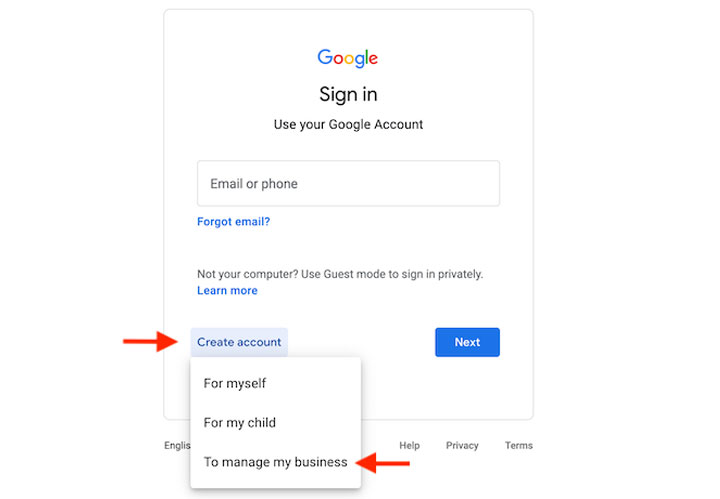
Step 2: Create the New Google Ads Account Properly
-
Go to Google Ads and sign in
-
Choose “Switch to Expert Mode”
-
Select “Create an account without a campaign”
-
Set your country, time zone, and currency carefully
-
These cannot be changed later
-
Choosing Expert Mode gives you full control and avoids automatic smart campaigns that often waste budget.
Step 3: Link Essential Accounts Immediately
After creating the new Google Ads account, link:
-
Google Analytics
-
Google Tag Manager (if available)
-
Google Search Console
This improves data accuracy, conversion tracking, and account trust.
New Google Ads Account Policy Rules You Must Know
Google enforces strict policies, and new accounts are reviewed more aggressively.
Common Reasons New Accounts Get Suspended
-
Misleading landing pages
-
Affiliate pages without value
-
Unclear business identity
-
Circumventing systems
-
Reused payment methods from banned accounts
-
Aggressive ad copy
Tip: Never rush ads on day one. Slow and clean setup wins.
Website Requirements for a New Google Ads Account
Your website plays a massive role in approval.
Minimum Website Checklist
-
HTTPS enabled
-
Clear navigation
-
About Us page
-
Contact page with email or phone
-
Privacy Policy and Terms
-
Fast loading speed
-
Original content
Avoid thin pages, copied content, or auto-generated pages.
Choosing the Right Campaign Type for New Accounts
Not all campaign types are safe for a new Google Ads account.
Best Campaign Types to Start With
-
Search campaigns
-
Brand keyword campaigns
-
Low-competition commercial keywords
Campaign Types to Avoid Initially
-
Performance Max
-
Display network
-
Discovery ads
-
Aggressive affiliate campaigns
Start small and let Google learn gradually.
Keyword Strategy for a New Google Ads Account
Keywords determine success or failure.
Best Keyword Types for Beginners
-
Exact match keywords
-
Brand keywords
-
High-intent commercial terms
-
Long-tail keywords
Example:
-
“buy accounting software”
-
“google ads consultant near me”
Avoid broad match in the first 2–3 weeks.
How Much Budget Should a New Google Ads Account Use
Google watches spending behavior closely.
Recommended Starting Budget
-
$5–$10 per day for small businesses
-
$10–$30 per day for services
-
Avoid sudden budget jumps
Gradually increase budget after 7–10 days of stable performance.
Bidding Strategy for New Google Ads Accounts
Best Initial Bidding Options
-
Manual CPC
-
Maximize Clicks (with bid limit)
Avoid These at First
-
Maximize Conversions
-
Target CPA
-
Target ROAS
Smart bidding works best after conversion data exists.
Conversion Tracking Setup (Critical for Trust)
A new Google Ads account without conversion tracking is like driving blind.
Must-Track Conversions
-
Form submissions
-
Phone calls
-
Purchases
-
Lead confirmations
Use Google Tag Manager if possible for clean implementation.
Ad Copy Best Practices for New Accounts
What Google Likes
-
Clear, honest messaging
-
Matching ad copy to landing page
-
No exaggerated claims
-
Professional tone
What to Avoid
-
“Guaranteed results”
-
“Best price ever”
-
Clickbait headlines
Good ads build trust, not hype.
First 14 Days Optimization Plan
Days 1 – 3
-
Launch limited keywords
-
Monitor disapprovals
-
Check landing page behavior
D 4 – 7
-
Pause poor keywords
-
Add negative keywords
-
Improve Quality Score
D 8 – 14
-
Increase budget slowly
-
Test second ad variation
-
Review search terms
Quality Score and Why It Matters
Quality Score affects:
-
Cost per click
-
Ad rank
-
Impression share
Improve Quality Score by:
-
Tight keyword grouping
-
Relevant ad copy
-
Fast landing pages
-
Clear call-to-action
New Google Ads Account vs Old Accounts
| Factor | New Account | Aged Account |
|---|---|---|
| Trust level | Low | High |
| Review strictness | Very high | Moderate |
| Learning speed | Slow | Faster |
| Risk | Higher | Lower |
Patience is the advantage new accounts need.
Can You Create Multiple New Google Ads Accounts?
Yes—but carefully.
Allowed
-
Different businesses
-
Different billing profiles
-
Different websites
Not Allowed
-
Circumventing suspensions
-
Reusing banned payment methods
-
Duplicate businesses
Always follow Google’s policies.
Common Mistakes to Avoid
-
Running ads on day one aggressively
-
Using copied landing pages
-
Ignoring disapproval warnings
-
Using VPNs or fake locations
-
Switching currencies later
Most suspensions are preventable.
How Long Does It Take for a New Google Ads Account to Stabilize?
Typically:
-
7–14 days: Learning phase
-
30 days: Performance normalization
-
60–90 days: Smart bidding readiness
Consistency matters more than speed.
E-E-A-T: Why This Guide Is Trustworthy
This guide is built on:
-
Hands-on Google Ads management experience
-
Up-to-date Google policy understanding
-
Real optimization workflows
-
Industry-standard best practices
No shortcuts. No risky tactics.
A properly structured new Google Ads account has the potential to evolve into a highly effective and reliable growth engine for businesses, service providers, affiliates, and digital publishers. When the foundation is built correctly, the account gains Google’s trust over time, resulting in better ad approvals, lower costs, and more consistent performance. Success at this stage depends heavily on patience, strict policy compliance, and thoughtful optimization during the early learning period, rather than aggressive scaling or risky shortcuts.
By approaching Google Ads as a long-term marketing investment instead of a short-term experiment or quick hack, advertisers position themselves for sustainable results. Over time, a well-managed account is rewarded with higher-quality traffic, more predictable cost-per-clicks, improved conversion rates, and the ability to scale campaigns confidently without triggering account issues or unnecessary spending.