Managing employees manually is no longer practical in today’s fast-paced digital workplace. Businesses of all sizes are turning to hr management software to automate payroll, recruitment, performance tracking, and compliance.
If you’re struggling with spreadsheets, manual attendance tracking, or disconnected HR systems, this guide will walk you through everything you need to know — from features and benefits to selection strategies and implementation best practices.
At LoadingTips.com, we analyze enterprise software solutions using real-world business requirements, industry standards, and modern compliance frameworks to ensure you make informed decisions.
What Is HR Management Software?
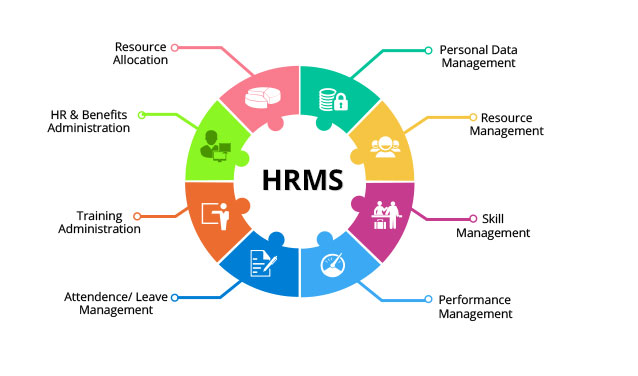
HR management software is a digital platform designed to streamline and automate human resource operations. It centralizes employee data, simplifies administrative tasks, and enhances workforce productivity.
Modern systems combine multiple HR functions into one platform, including:
-
Employee data management
-
Payroll processing
-
Recruitment & onboarding
-
Attendance & time tracking
-
Performance management
-
Compliance monitoring
-
Reporting & analytics
Instead of using multiple disconnected tools, businesses can manage their entire workforce ecosystem from one secure system.
Why Businesses Need HR Management Software in 2026
Organizations are rapidly adopting digital HR tools because workforce management has become more complex.
Here are the main drivers:
1. Remote & Hybrid Work Models
Distributed teams require cloud-based HR systems that allow:
-
Digital document submission
-
Online attendance tracking
-
Self-service portals
2. Compliance & Legal Regulations
Labor laws constantly change. HR platforms help ensure:
-
Tax compliance
-
Automated reporting
-
Secure document storage
3. Automation & Cost Reduction
Manual HR tasks consume time and resources. Automation reduces:
-
Administrative overhead
-
Payroll errors
-
Redundant paperwork
4. Data-Driven Decision Making
HR analytics dashboards allow leadership to:
-
Monitor turnover rates
-
Track employee performance
-
Forecast hiring needs
Businesses that fail to digitize HR risk falling behind competitors.
Core Features of Modern HR Management Software
When evaluating solutions, look for these essential features.
1. Employee Information Management
A centralized employee database should include:
-
Personal information
-
Employment contracts
-
Salary records
-
Leave balances
-
Performance history
This eliminates scattered spreadsheets and reduces errors.
2. Payroll Automation
Payroll modules should support:
-
Tax calculations
-
Overtime tracking
-
Direct deposit integration
-
Payslip generation
-
Compliance updates
Automated payroll reduces costly mistakes and improves employee trust.
3. Recruitment & Applicant Tracking (ATS)
An integrated ATS allows you to:
-
Post jobs to multiple platforms
-
Track applicants
-
Schedule interviews
-
Evaluate candidates
-
Onboard new hires digitally
This speeds up hiring and improves candidate experience.
4. Time & Attendance Tracking
Modern solutions include:
-
Biometric integration
-
GPS tracking
-
Remote clock-in
-
Leave management automation
Accurate tracking ensures payroll accuracy.
5. Performance Management
Performance modules allow:
-
Goal setting
-
360-degree feedback
-
KPI tracking
-
Appraisal documentation
This improves employee engagement and accountability.
6. HR Analytics & Reporting
Advanced reporting dashboards provide insights into:
-
Employee turnover
-
Productivity trends
-
Workforce costs
-
Diversity metrics
Data-backed HR decisions increase organizational efficiency.
Types of HR Management Software
Understanding system categories helps narrow your selection.
1. Cloud-Based HR Systems
-
Accessible anywhere
-
Subscription pricing
-
Automatic updates
-
Scalable infrastructure
Best for SMEs and remote teams.
2. On-Premise HR Systems
-
Installed locally
-
Greater control
-
Higher initial cost
-
Manual maintenance
Best for large enterprises with strict data policies.
3. All-in-One HR Suites
These platforms combine payroll, recruitment, performance, and analytics in one solution.
Ideal for growing businesses that want a unified platform.
4. Specialized HR Tools
These focus on one area, such as:
-
Payroll-only systems
-
ATS platforms
-
Time-tracking software
Best for businesses that already use multiple systems.
Benefits of Implementing HR Management Software
Organizations that implement modern HR solutions experience measurable improvements.
1. Increased Operational Efficiency
Automation reduces repetitive tasks and manual errors.
2. Improved Employee Experience
Self-service portals allow employees to:
-
Download payslips
-
Request leave
-
Update personal data
3. Better Compliance Management
Automated updates ensure labor law adherence.
4. Scalable Growth
As your workforce grows, the system scales without major infrastructure upgrades.
5. Data Security
Enterprise-grade encryption protects sensitive employee information.
How to Choose the Best HR Management Software
Choosing the right platform requires a structured approach.
Step 1: Define Your Business Needs
Ask:
-
How many employees do we have?
-
Do we need payroll automation?
-
Do we require multi-location support?
Step 2: Evaluate Integration Capabilities
The system should integrate with:
-
Accounting software
-
ERP systems
-
CRM platforms
-
Biometric devices
Seamless integration reduces data duplication.
Step 3: Consider Scalability
Choose software that grows with your company.
Step 4: Check Security & Compliance
Look for:
-
Data encryption
-
GDPR compliance
-
Role-based access controls
-
Audit trails
Security is critical in HR systems.
Step 5: Compare Pricing Models
Common pricing structures include:
-
Per employee per month
-
Tiered subscription plans
-
Custom enterprise pricing
Always evaluate long-term cost versus ROI.
Common Mistakes When Buying HR Management Software
Avoid these costly errors:
-
Choosing based only on price
-
Ignoring integration capabilities
-
Overlooking compliance requirements
-
Skipping employee training
-
Not planning for data migration
Strategic planning ensures smooth implementation.
Implementation Best Practices
Successful deployment requires preparation.
1. Assign an HR Tech Lead
Designate someone responsible for:
-
Vendor communication
-
Implementation timeline
-
Staff training
2. Clean & Prepare Data
Before migration:
-
Remove duplicate records
-
Standardize employee data
-
Backup files securely
3. Train Employees
Offer:
-
Video tutorials
-
Onboarding sessions
-
Help documentation
User adoption determines system success.
4. Monitor & Optimize
After launch:
-
Track usage metrics
-
Collect feedback
-
Adjust workflows
Continuous improvement ensures ROI.
HR Management Software for Small vs Large Businesses
For Small Businesses
Look for:
-
Affordable cloud-based plans
-
Basic payroll + attendance features
-
Easy setup
SMEs benefit most from automation due to limited HR staff.
For Large Enterprises
Prioritize:
-
Advanced analytics
-
Multi-country payroll
-
API integrations
-
Custom workflows
Enterprise-level HR requires scalable architecture.
Emerging Trends in HR Technology
HR technology is evolving rapidly.
1. AI-Powered Recruitment
AI screens resumes and predicts candidate success.
2. Predictive Analytics
Systems forecast:
-
Employee turnover
-
Workforce planning needs
3. Mobile-First HR Platforms
Employees expect full mobile functionality.
4. Employee Experience Platforms (EXP)
HR systems now focus on engagement, not just administration.
ROI of HR Management Software
Businesses often ask: Is it worth the investment?
Here’s how ROI is calculated:
-
Reduced payroll errors
-
Decreased administrative hours
-
Faster hiring cycles
-
Lower employee turnover
-
Improved compliance
Many companies recover costs within 12–18 months.
Security Considerations You Should Never Ignore
Because HR data includes sensitive information, ensure:
-
Multi-factor authentication
-
End-to-end encryption
-
Regular security audits
-
Role-based permissions
A data breach in HR systems can cause severe financial and reputational damage.
Frequently Asked Questions
What is the difference between HRIS and HR management software?
HRIS typically focuses on employee data storage, while broader HR systems include payroll, recruitment, and analytics.
Is HR software suitable for startups?
Yes. Cloud-based solutions are affordable and scalable.
How long does implementation take?
Small businesses: 2–6 weeks
Large enterprises: 3–6 months
Final Thoughts
Investing in the right hr management software can transform how your organization operates. From payroll automation to AI-powered recruitment and workforce analytics, modern HR platforms deliver efficiency, compliance, and strategic insights.
As workforce expectations evolve and regulatory requirements become stricter, companies must adopt secure, scalable, and intelligent HR solutions.
At LoadingTips.com, we recommend carefully evaluating features, integration capabilities, security standards, and scalability before making a decision. With the right strategy, HR technology becomes not just an operational tool — but a competitive advantage.